
Business Phone Systems at a Glance
Businesses typically compare four practical types of phone systems: legacy key systems and digital PBXs, on-premises IP-PBXs, cloud PBX or UCaaS platforms, and virtual phone systems for very small teams.
VoIP is the technology used to carry calls over an IP network. It can be used with an on-premises PBX, a cloud-hosted phone system, desk phones, softphones, and mobile apps.
The right business phone system depends on the number of users and locations, existing phones and cabling, internet reliability, remote-work needs, required integrations, budget, and the long-term availability of equipment and support.
Article Revised: 8/16/2026
| System type | Where it operates | Typical best fit |
|---|---|---|
| Key system or digital PBX | At the business location | Small existing sites with compatible phones, wiring, and reliable support |
| On-premises IP-PBX | At the business or in a private data center | Businesses that need local control, specialized integrations, or hybrid phone deployments |
| Cloud PBX or UCaaS | Provider cloud | Multi-site, hybrid, remote, and growing organizations |
| Virtual phone system | Provider cloud with mobile and web apps | Solo operators and very small teams that do not need a full PBX |
Key Systems or Digital PBXs
A key system or digital PBX is an on-premises multi-line phone system commonly used by smaller offices. Many use proprietary desk phones that connect to a specific control unit or PBX and may reuse existing multi-pair station cabling.
These systems commonly support extensions, shared outside-line appearances, call hold and transfer, voicemail, auto attendant, direct inward dialing (DID), and basic call routing. A user can see whether a shared line or extension is busy through a line key or LED indicator, depending on the phone model and system configuration.
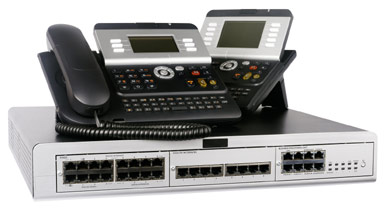
Many include an auto attendant, voicemail, extension dialing, call transfer, and basic call routing. Phone service is routinely delivered by a local phone company, either as ordinary business CO (Central Office) lines or a PRI (Primary Rate Interface), (although now in 2026 PRI circuits are declining and SIP is increasing.)
PRI has become a legacy, but still deployed option, it is not the default choice for most new installations. SIP trunking is now the most common IP-based alternative for voice connectivity. Carriers are retiring older copper and TDM services which makes a PRI-only strategy less favored.
When a customer calls the business number, it routes to the phone KSU or PBX, which then handles the call. If the CO line is active, the phone company rolls the call to the subsequent line sequentially. Many small businesses have three, four or eight lines. In North America, a T1 PRI commonly provides 23 B channels and can support up to 23 simultaneous voice or data calls.
It's easy to become overwhelmed with all the information obtainable. A preferable option is to respond to a few straightforward questions and let a professional quote a solution.
An automated attendant transfers incoming calls to particular phones or departments; a very desirable feature for many businesses. On some digital telephone systems, each incoming phone line appears on its own separate button. On many key systems, each outside line appears on a dedicated button. Users can select a line manually and see its busy or idle status through a line key or LED indicator. Line appearances allow employees to recognize who is on a call and who is not. Many employees have grown accustomed to this feature, especially in very small business environments, and can be reluctant to give it up.
Companies regularly choose digital phone systems which accept existing station cabling rather than having to pull new Ethernet cables.
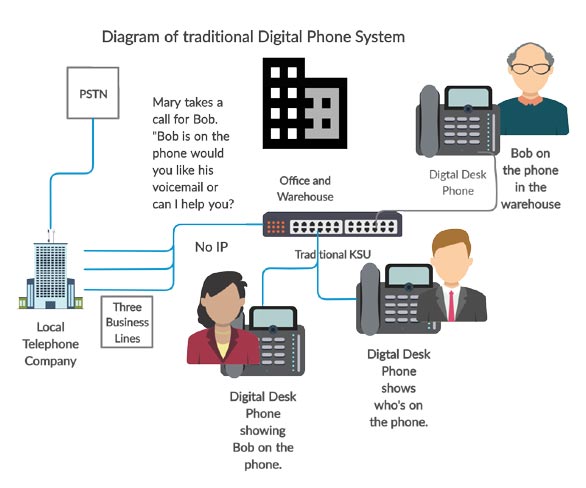
Cabling frequently figures in the decision process when choosing a phone system, as digital phones can connect to existing traditional phone wiring. IP phones typically use an Ethernet cable.
Some digital phone systems provide IP technology. The Avaya IP Office can be digital, IP or a combination of both. Hybrid installations represent a cost-effective solution.
Most digital on-premise phone systems connect to CO lines (traditional business lines) or a PRI from the local telephone company. This enables business owners to remain with their current telephone service if already established.
On-Premises IP-PBX Systems
An IP-PBX business phone system is a PBX that uses IP to deliver voice or video over a data network. They can interoperate with the Public Switched Telephone Network (PSTN) or through VoIP (Voice over Internet Protocol) or a combination of the two. An IP-PBX remains a substantially more advanced system than earlier PBXs incorporating more recent technology with noteworthy advanced feature-sets.
Advantages and Disadvantages of On-premise Phone Systems
Advantages
- Predictable, controlled costs. Upfront capital expense with minimal recurring subscription fees; refurbished systems still reduce cost, but availability is shrinking as vendors phase out legacy gear.
- Very durable and long lasting. Once installed, on-premise phone systems regularly operate for years without the need for upkeep. Many systems can run 10–15+ years, but vendor support and parts availability are increasingly limited.
- Easy to identify what line is being used (who's on the phone). Some phones include LEDs that show if that line (or extension) is in use.
- Local control and data ownership. Call routing, recordings, and configs remain on-site, which can help with certain compliance or privacy requirements.
- The ability to connect phones to actual phone outlets through existing phone wiring. Using existing telephone wiring to locations where no Ethernet cable exists keeps costs down.
- Some systems can incorporate a PRI interface for companies that choose to remain with a PRI. PRI has declined in favor of SIP trunking which is now more common and often cheaper.
Limitations
- Often older legacy technology that can be costly to include other features or integrate with some business applications. Many manufacturers have sunset or are phasing out on-prem platforms, making updates, parts, and expertise harder to find.
- Key systems are limited in the number of lines, and telephones, and therefore remain a choice only for very small businesses.
- Proprietary; require specific phones and equipment.
- A telecom technician is required to complete a cross-connect for phone moves and make programming changes. (Phone technician service on site.)
- Even though some digital systems allow for the addition of IP phones, auxiliary equipment and licensing can increase costs.
- Setting up remote phones is not routinely straightforward.
- Carriers continue to retire PRI services in favor of SIP, reducing long-term viability of PRI-dependent setups.
IP-PBXs Can offer the Most Recent Technology
New IP-PBXs incorporate the most recent innovative technology including multi-channel communications. For instance, Mitel, Cisco and Avaya deliver feature-rich enterprise solutions worldwide. Likewise, there are several leading on-premise PBX manufacturers providing outstanding systems for small businesses, like Mitel, Allworx and Sangoma, to name a few.
Pros
- Most recent technology using IP. Some IP-PBXs support both digital and IP and are remarkably effective in hybrid environments.
- Total in-house control of your phone system.
- Advanced feature sets with capabilities to integrate most business apps.
- One network, all data. Or can be divided into an all-IP voice and data network.
- Easy phone moves for IP phones.* (No cross-connects, just like with a PC; move the phone from one data connection to another, connect it, and everything is the same.)
- Save maintenance costs (adds, *moves, changes).
- VoIP capable. SIP trunks can be setup for to possible lower costs.
Cons
- Regularly more costly than other types of digital PBX systems.* Initial costs are greater than implementing a hosted solution; however, over time are frequently lower in cost.
- Some proprietary systems require particular hardware and licensing fees.*
- Upgrades and maintenance requires knowledgeable admin people or vendor-specific technicians, which can be costly.
- Proper data cabling must be in place.
- Several on-premise manufacturers have periodically discontinued products. These changes have forced companies to replace or upgrade systems for lack of support and upgrades.
On premise systems are often more effective for the following types of businesses:
- Retail stores that require between three and eight phone lines. Businesses like parts stores, manufacturing facilities, industrial, warehouses, etc.
- Facilities which are part office and warehouse or part office and manufacturing. Installations which require the use of regular phone wiring. Businesses that want to remain with an existing PRI circuit.
- Hotels and motels, which typically possess a considerable number of phones which are not in constant use, and where updating the cabling infrastructure would be costly.
*NOTE: Some Asterisk-based VoIP appliances remain very reasonable in cost. They will operate with a variety of IP phones and frequently incorporate features without any add-on licensing fees. These systems can be self-managed by data savvy personnel, however, are more difficult than hosted VoIP platforms. Several manufacturers include support for customers who have purchased their appliance.
Cloud PBX and UCaaS Systems
An IP phone and computer can share the same Ethernet cable.
A Cloud based PBX service or hosted VoIP represent a
leading choice for a business communications platform. Providers
typically present a selection of plans that incorporate a set package of features
to accommodate various business needs.
Cloud-based providers
deliver multi-channel
communications that integrate video, chat and voice.  Smart phones
connect right up, so
employees can remain totally connected from anywhere.
Smart phones
connect right up, so
employees can remain totally connected from anywhere.
Hosted systems are often easier to deploy for remote employees because users can sign in through desk phones, mobile apps, or softphone clients.
Cloud PBX can lower capital expense and simplify remote
work, but the total cost depends on seat count, feature
tiers, taxes, device purchases, contact-center licensing, and
internet/network upgrades.
And
there are a limited number of specialized virtual phone services
tailored to provide entrepreneurs effective business communications to add to
their existing smart phone service. These services, like Grasshopper
and Openphone are uniquely designed platforms for decidedly small or solo companies.
Advantages
- Advanced multi-channel technology where providers regularly enhance their platforms to remain competitive.
- Easy for at home and remote employees to connect and communicate exactly like at the office.
- Tools for collaboration and customer management. Many systems incorporate smart phone apps for remote connectivity.
- Advanced secure, multi-channel features with integration with separate business apps.
- Much lower initial costs. No requirement to continually budget for updates or innovative technology as the provider includes new features when developed as part of their service.
- Fast, simple installation that can be done quite quickly. Ability to self-manage and administer the system. Providers include support. Easy to setup at-home workers.
- Most cloud platforms offer mobile apps that extend the business number to iOS and Android devices.
- Equipment and software maintenance, upgrades and system administration is performed by the provider.
Limitations
- On-going monthly costs, which are regularly charged by the phone or seat. Phones which may not see much use still get charged the monthly fee. (This can be a significant factor within the hospitality industry.)
- VoIP requires stable Internet service.
- Some credit card machines, elevator phones and alarm systems may call for a traditional analog line from a traditional phone company.
- Some advanced features require a more expensive plan. However, several hosted VoIP providers offer specific plans which include a multitude of sophisticated features for one set price. Some providers require a yearly commitment for their best pricing.
- Larger companies with more than 50 employees/phones often require additional more-sophisticated in-house network equipment and administration.
Virtual phone systems for small teams
- Any business with multiple locations. Global companies that call internationally. Businesses that regularly have considerable numbers of inbound or outbound calls.
- Any new office or business that uses remote or at home employees. Businesses that want integrated video and chat. Companies that want built-in CRM capabilities.
- Call centers that do not retain capable IT staff that can setup and manage an in-house solution.
- On the go entrepreneurs and sales people.
What has changed for business phone systems
New installations increasingly use SIP trunks, cloud PBX/UCaaS, and IP endpoints rather than a new PRI or traditional analog line deployments. Organizations keeping a legacy PBX should verify carrier service, vendor support status, replacement-part availability, remote-work requirements, and emergency-calling configuration before committing to a long-term strategy. Carrier transitions away from copper and older TDM services are an important planning factor, especially for sites using analog devices, PRI, alarms, elevators, fax, or specialty equipment.
How to Choose a Business Phone System
The best business phone system depends on the organization’s existing infrastructure, operation, and long-term support requirements. A key system or digital PBX may remain cost-effective for a small existing site with compatible phones, usable cabling, and reliable service support.An on-premises IP-PBX can be a strong choice when local control, specialized integrations, hybrid endpoints, or on-site survivability matter most. Cloud PBX and UCaaS platforms are often better suited to multi-site, remote, and rapidly changing organizations that need mobile apps, softphones, centralized administration, and simplified deployment.
Before deciding, compare total cost, carrier availability, internet resilience, emergency-calling needs, specialty-device compatibility, vendor lifecycle status, and the features employees will actually use.
Top On Premise PBXs Best Business Phone Systems Best Virtual Phone Services for Startups Best Cloud PBX Companies