A Business Phone Number Without a Second Mobile Phone
Reviewed and updated:
Grasshopper gives entrepreneurs and small teams a business phone number with calling, texting, voicemail, and call-handling tools. Its mobile and desktop apps help you manage business conversations while keeping your personal number private.
Our take: Grasshopper is worth considering when you want a professional business presence without the complexity of a larger communications platform. Compare the plans by the users, numbers, extensions, and call-handling features your business actually needs.
Grasshopper is an affordable, easy-to-use virtual phone system designed for entrepreneurs and micro-businesses that want a professional business presence without investing in additional hardware or a separate phone. It provides a dedicated business phone number that works with your existing smartphone or desk phone, helping you keep business and personal calls separate while protecting your personal number. With its simple setup and convenient features, Grasshopper makes it easy to manage business communications, stay organized, and present a professional image to customers without the expense or complexity of a traditional business phone system.

Grasshopper phone system is designed to enhance your phone service, not replace it.
Grasshopper's cloud system offers Android and iOS apps, as well as a desktop computer app, allowing a user to receive calls on their business number anywhere. Designed to never miss a call, Grasshopper indicates when an incoming call is business and then by using their easy-to-employ tools, you can treat those calls uniquely.
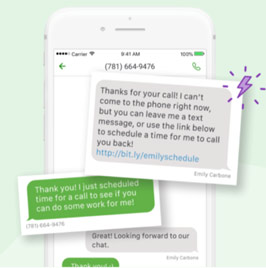
Grasshopper’s Instant Response automatically texts new callers when you miss their call.
Grasshopper helps you greet callers professionally and route calls to the right person or department. Depending on your plan and settings, multiple calls can be directed to available team members. If you miss a new caller, Instant Response can automatically send a text acknowledging the inquiry and inviting them to reply with details.
| Plan | Main Buying Question | Included Capacity |
|---|---|---|
| True Solo | Am I the only person handling business calls? | One user, one phone number, one extension |
| Solo Plus | Do several people need access to one main business number? | Unlimited users, one phone number, three extensions |
| Small Business | Do I need multiple public numbers or more extension capacity? | Unlimited users, four phone numbers, unlimited extensions |
Grasshopper Phone Pricing
Grasshopper offers True Solo, Solo Plus, and Small Business plans. Compare included users, phone numbers, extensions, and plan-specific features—not just the advertised monthly price. They are priced at $14.00, $25.00, and $55.00 monthly (when paid annually). Additional phone numbers can be added for $9/mo. each.
- TRUE SOLO- 1 User, 1 Phone Number, 1 Extension
- SOLO PLUS- Unlimited Users, 1 Phone Number, 3 Extensions
- SMALL BUSINESS- Unlimited Users, 4 Phone Numbers, Unlimited Extensions
If several people need to help answer business calls, compare Solo Plus before choosing a service that charges separately for every user. Its appeal is shared access to a main business number—but the included extension allowance still matters.
Upgrading because you are adding another employee is not nesessary. Solo Plus already includes unlimited users. Consider Small Business when you need more business numbers or more than three extensions.
Users, Phone Numbers, and Extensions: What Is the Difference?
- Users are the people who access the account or apps, subject to the plan's permissions and capabilities.
- Phone numbers are the public-facing numbers customers dial or use to contact your business.
- Extensions provide internal routing choices for employees, departments, or information.
A shared business number does not mean every employee needs a separate public number. Likewise, unlimited users does not automatically mean unlimited extensions or identical access to every feature.
Features That Make Grasshopper Stand Out
- Incoming Call Management: Allows you to easily customize how and when you receive business calls. Set business hours and away greetings for other times. You can set up individual extensions to handle calls uniquely.
- Call Recording: Available on eligible plans. Confirm the supported calling modes, recording settings, retention period, and any transcription or summary features before subscribing.
- Business Texting: Send and receive unlimited texts from your business number.
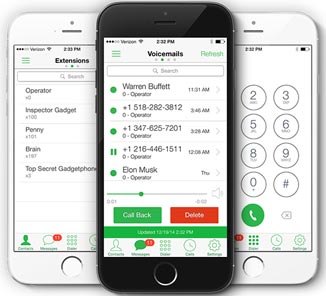
- Web-based Voicemail: Voicemail recordings arrive as MP3 attachments in your inbox. Every time you receive a message, transcription automatically reconstructs voicemails to text, so you can then read them on your computer, iPhone, or Android device.
- Conversation Filters: Filter to only messages, calls, voicemails, faxes, or any mix of these. Conversation Search: Locate clients, messages, or multiple matches within any conversation.
- Virtual Phone Extensions: Using extensions allows automatic routing of calls to information or a department or an employee.
- Voice Studio: Grasshopper makes it easy to record, upload or have a professional recording made. (An extra fee is required if you choose Grasshopper to record using a professional voice talent.)
- Instant Response: When you miss a call from a new client, Grasshopper can automatically send an SMS message letting them know you’re unavailable.
How Grasshopper Helps with Everyday Business Calls
- You are working at a customer's property: Receive business calls on your mobile device without publishing your personal number.
- You cannot answer a new inquiry: Where supported and configured, Instant Response can automatically text a new caller to acknowledge the inquiry. It gives the caller another way to respond, but does not guarantee that the prospect will wait.
- You are closed for the evening: Use business-hours settings and greetings to explain your availability and direct callers to the appropriate destination or voicemail.
- Several people handle customer inquiries: Use extensions and call forwarding to direct callers to the appropriate person without asking them to dial another number.
- You cannot listen to a voicemail: Read a voicemail transcription to review the message when listening to the recording is inconvenient.
- You want consistent, professional greetings: Record or upload your own greetings, or consider a paid professional recording service.
Confirm feature availability, plan requirements, and any additional charges before subscribing. Business texting requires a paid account and SMS registration.
Grasshopper Review: Pros and Cons
Advantages for Owners and Small Teams
- Separate business and personal communications: Use a dedicated business number on your existing smartphone without publishing your personal number or carrying a second handset.
- Professional call handling: Greetings, forwarding, business-hours settings, and extensions help organize incoming calls. Available capabilities depend on your plan.
- Mobile and desktop access: Manage business calls, texts, and voicemail through the apps without installing an office PBX.
- Convenient follow-up tools: Voicemail transcription and Instant Response help you review messages and acknowledge new inquiries when answering immediately is inconvenient.
- Room for a shared business number: Solo Plus and Small Business include unlimited users, making them worth comparing with services that charge separately for every employee. Number and extension allowances still apply.
- Grasshopper Support: Grasshopper customer service has 24/7 phone support along with live chat support and easy-to-find help topics on its website.
- Additional professional features: Evaluate available vanity numbers, paid professional greetings, and recording on eligible plans against your business requirements.
Limitations and Costs to Consider
- Annual commitment for the lowest rate: Compare the total annual payment with monthly billing, rather than judging the service only by its advertised monthly equivalent.
- Plan limits still matter: True Solo is intended for one user. Higher plans offer unlimited users, but included phone numbers, extensions, and features vary.
- Texting requires activation: Business texting requires a paid account and SMS registration. Confirm current requirements and any associated charges.
- The trial has restrictions: Texting is not included, so the free trial cannot demonstrate your complete calling-and-messaging workflow.
- It is not a mobile carrier replacement: You still need suitable phone service or internet access for your chosen calling arrangement. Test call quality and app behavior on the connections you expect to use.
Grasshopper Phone Review Conclusion
Grasshopper is worth shortlisting when your priority is a professional business number, straightforward call handling, and mobile access without installing an office phone system. Start with True Solo for one person, compare Solo Plus when several people need access, and consider Small Business when additional numbers or extensions justify the upgrade. Use the trial to test call handling and voicemail, but remember that texting requires a paid account.
We may earn a commission when you purchase through links on this page.