

Quo, formerly OpenPhone, is a business phone service that brings calls, texts, voicemail, and shared customer conversations into mobile and desktop apps. It is worth considering if you want a separate business number on your existing devices or need several teammates to manage the same customer conversations. It delivers your business calls, texts, and contacts into one integrated unified communications platform that works anywhere.
Reviewed and Updated: November 5, 2026
Our assessment: Starter is the lower-cost option for basic business calling and texting. Business is the plan to evaluate when you need call transfers, phone menus, automatic call recording, and AI summaries for calls. Scale adds AI call tags, dedicated onboarding, and additional support options. The main cost caveat is that messaging registration, automated SMS, international usage, and additional AI answering capacity can increase your bill.
What Is Quo, Formerly OpenPhone?
Quo is an internet-based business phone platform for individuals and teams. It works on iOS, Android, and desktop, allowing you to make and receive business calls and messages without using your personal number as your public business contact.
Each paid user includes one local or toll-free phone number. You can select a new number or port an existing number into Quo. Porting is free, although charges can apply if you keep more numbers than your plan includes.
The platform combines phone service with shared conversation histories, contact notes, and internal collaboration tools. These features can help a small team coordinate customer communication, but should not be confused with a full CRM system.
Quo Pricing: Starter vs. Business vs. Scale
Quo has three subscription plans. Annual billing lowers the equivalent monthly price but requires payment for the year. All prices below are in US dollars, before applicable taxes, fees, and optional usage charges.
| Plan | Monthly billing | Annual billing | Annual total | Who should consider it? |
|---|---|---|---|---|
| Starter | $19 per user/month | $15 per user/month, billed annually | $180 per user | Entrepreneurs and small teams that need business calling, texting, and basic collaboration |
| Business | $33 per user/month | $23 per user/month, billed annually | $276 per user | Teams that need call transfers, phone menus, automatic recording, and AI call summaries |
| Scale | $47 per user/month | $35 per user/month, billed annually | $420 per user | Businesses that need AI call tags, dedicated onboarding, and additional support |
All prices are in US dollars and charged per user. Annual billing requires payment for the year. Applicable taxes, fees, add-ons, and usage charges are extra.
Starter: Basic Business Calling and Texting
Starter includes calling and messaging to US and Canadian numbers, subject to Quo's fair use policy, plus voicemail transcripts, manual call recording, and email ticket support. The plan also includes access to Sona with a limited included credit allowance.
Starter's important limitation is call handling: phone menus, call transfers, and custom ring orders are included with Business. Starter also does not include the same all-call AI summaries and transcripts available on the higher plans. Its included summaries and transcripts apply to Sona-handled calls.
Business: More Call Handling and Team Tools
Business adds phone menus, call transfers, group calling, custom ring orders, automatic call recording, analytics, live chat support, and AI call summaries and transcripts. It also includes HubSpot and Salesforce integrations.
This is the plan we would evaluate first for a team that regularly routes calls between people or needs searchable records of customer calls. At annual rates, it costs $8 more per user per month than Starter.
Scale: AI Call Tags and Additional Support
Scale adds AI call tags, dedicated onboarding support, priority live chat and email support, and inbound phone support. Quo's phone support hours are Monday through Friday, 8 a.m. to 5 p.m. Pacific Time.
Consider Scale when these specific additions justify the higher per-user cost. Businesses that mainly need transfers, menus, and automatic recording should compare Business carefully before paying for the top tier.
Additional Quo Fees to Include in Your Budget
The subscription is not necessarily your total cost. Check the following charges before comparing Quo with another business phone service:
- Additional phone numbers: $5 per month each. Quo's add-on card specifies annual billing.
- US messaging registration: $19.50 one-time carrier review and setup fee.
- Recurring messaging fee: $1.50 to $3 per month, depending on the messaging use case.
- Automated outgoing SMS through the API, Zapier, or Make: $0.01 per message segment. A message can contain multiple segments.
- International calling and messaging: destination-based usage charges outside the included US and Canada coverage.
- Sona AI answering: paid tiers and overage charges can apply beyond the included allowance.
Calling, Texting, and Team Collaboration
Keep Business Communication Separate
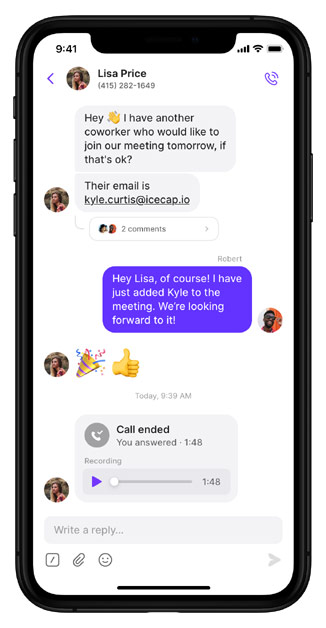
Quo gives customers a business number to call or text, while your personal number remains private. Calls use your internet connection rather than your mobile plan's voice minutes. Wi-Fi or mobile data is still required, and your internet or mobile provider's charges can apply.
Share Customer Conversations
Shared phone numbers let teammates access call and text histories. Internal threads and contact notes provide a place to exchange context without including the customer in the discussion.
This is useful when more than one employee responds to the same customers: the next person can review the conversation instead of relying on a separate handoff. Quo offers shared-number access for up to 10 paid users on Starter and unlimited paid users on Business and Scale.
Use Business Hours and Automatic Replies
Business hours help control notifications outside your working schedule. Automatic replies can respond to texts, missed calls, or voicemails with a predefined message. For example, a reply can tell a caller when your team expects to be available again.
Connect Calls With Your Other Business Tools
Quo's integrations and automation options include Slack, Zapier, Make, webhooks, and its API. Availability varies by integration and subscription. Check your specific CRM connection and any automation usage charges before selecting a plan.
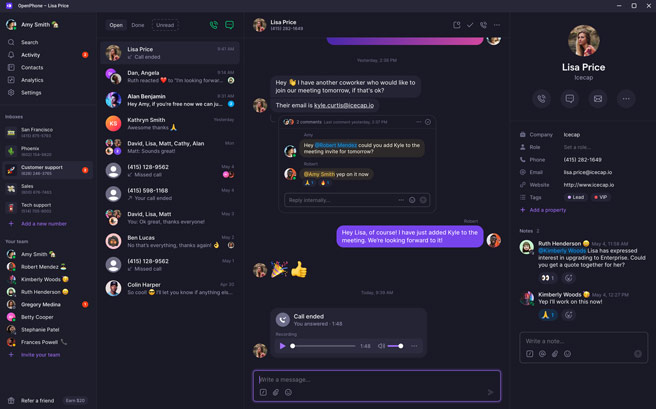
Earlier OpenPhone interface shown. Quo's current interface may differ.
Shared conversation histories and contact notes help teammates review previous customer interactions before responding. These tools support day-to-day coordination without replacing a dedicated CRM.
Sona AI Answering and Call Transcription
Sona is Quo's AI answering agent. It can answer calls when your team is unavailable, including after hours. Every plan gets 1,000 included automation credits, equivalent to 10 Sona calls at 100 credits per call. Included access does not mean unlimited AI answering.
Quo's Sona has five tiers: a free tier, $25, $49, $99, and $199 per month, with different credit allowances. The free tier has a $1 overage rate per call; each next paid tier reduces overage rates.
Voicemail Transcripts Are Not the Same as Call Transcripts
- Voicemail transcripts: included on all subscription plans.
- Starter call summaries and transcripts: included for calls handled by Sona.
- Business and Scale: include AI call summaries and transcripts for calls beyond Sona-handled conversations.
- AI call tags: a Scale feature for automatically categorizing relevant calls using defined tags.
During the trial, test Sona against the questions your customers actually ask. Review transcripts for names, addresses, and industry terminology rather than assuming automated output will always be accurate.
Quo Pros and Cons
Pros
- A separate business number on your existing mobile and desktop devices.
- Shared call and text histories for coordinating customer conversations.
- Contact notes, internal threads, and automatic replies.
- Manual call recording on Starter and automatic recording on Business and Scale.
- A seven-day trial to evaluate the service before committing to a subscription.
- Sona AI answering is available on every plan, with a limited included allowance.
Cons and Limitations
- Call transfers, phone menus, and custom ring orders require Business or Scale.
- Starter support is limited to email ticket support.
- Messaging registration, automation, and AI usage can add to the advertised subscription price.
- The free Sona allowance covers only 10 calls.
- Internet connectivity is required for calling and messaging.
- Virtual numbers may not be accepted by services that send two-factor authentication codes.
Our Verdict: Who Should Consider Quo?
Quo is worth shortlisting for entrepreneurs and small teams that want business calling and texting in one app, especially when several people need access to customer conversation histories.
Choose Starter if your requirements center on a business number, calling, texting, and basic collaboration. Evaluate Business if transfers, phone menus, automatic recording, or all-call summaries are essential. Consider Scale when AI call tags and additional support justify the higher cost.
PBXMechanic may earn affiliate commissions from qualifying purchases through links on this page.
Before subscribing annually, use the trial to check call quality on your usual internet connections, mobile notifications, shared-number workflows, and the settings your team will use. Budget separately for registration fees and any AI or automation usage.
Quo Alternatives to Compare
Compare the cost for your entire team, not just the entry-level advertised price. Include the users, numbers, call-routing features, texting requirements, and support channels your business actually needs.
- Talkroute review
- Grasshopper review
- Unitel Voice review
- Compare virtual business phone systems
- Compare hosted VoIP providers
Frequently Asked Questions About Quo
Is Quo the same service as OpenPhone?
Quo is the current name of the business phone service previously known as OpenPhone. Older reviews and screenshots may still use the OpenPhone name.
How much does Quo cost?
Starter costs $15 per user per month with annual billing or $19 with monthly billing. Business costs $23 annually or $33 monthly, and Scale costs $35 annually or $47 monthly. Annual prices are monthly equivalents billed for the year. Taxes, fees, and usage charges can apply.
Does Quo include a phone number?
Each paid user includes one local or toll-free number. You can choose a new number or port an existing number. Additional numbers cost extra.
Is Sona included with Quo?
Yes. Each plan gets access to Sona with 1,000 automation credits, equivalent to 10 calls. Additional usage can incur charges.
Does Quo Starter include call recording?
Starter includes manual call recording. Business and Scale include automatic call recording.
Can Quo transfer calls?
Call transfers are included on Business and Scale, not Starter.
Can I keep my existing business number?
Quo offers free number porting. Confirm that your number is eligible and follow the transfer instructions before canceling your existing service.