ShoreTel ShoreGear PBX and ShoreTel IP Phone Manuals
Shoretel, now a wholly-owned subsidiary of Mitel, (see below), offers high-end IP phone systems. Here you will find several of their popular Shoregear phone guides in PDF including the Shoreware Administrator Guide. Plus Shoretel 560 and Shoretel 230 manuals. Known for their outstanding line of IP PBX systems, Shoretel, started in 1990, strived to be a major player in the larger company market, from mid-sized to enterprise and aimed as a high-end alternative to compete with Cisco. Shoretel systems use proprietary phones, a traditional telecom PBX companies' fee based licensing and were sold through authorized dealers.
Mitel, who acquired Shoretel in 2017 ended ShoreTel Connect and all are end of life. Mitel already for some time announced the end of life of the ShoreTel 14.2 software and all of the previous software releases. MiVoice Connect is the recommended path for upgrading. ShoreTel Connect has become Mitel MiVoice Connect. Shoretel's great technology still resides under the hood, so to speak, which makes ShoreTel now Mitel MiVoice Connect once upgraded. If you're looking to move to a new shoretel phone system, then here's the answer. The ShoreTel name is no longer, its become MiVoice.
Shoretel was one of our recommended PBXs. For a current list, which now includes Mitel MiVoice Connect, of our Ten best on-premise PBXs.
Shoretel IP Phone Guides and Brochures and Shoregear Manuals
Download Shoretel phone, (known as Shore-phone) guides for the 110IP, 230IP, and the 500 series IP phones along with the 8000 conference phone user guide. These phones are proprietary phones for Shoregear IP-PBX switches and other Shoretel equipment. Although they are IP they cannot be used with Asterisk based PBXs like other standard based SIP phones such as Polycom, Digium, Grandstream and others.
Which ShoreTel Manual Do I Need?
Not sure which guide to grab? Match what you're trying to do to the table below.
| What you need | Which guide |
|---|---|
| I just got a phone and want to make calls | Start with the Quick Guide for your model (110ip, 230ip, or 530/560/560g) — short, task-focused cheat sheets for everyday use. |
| I want full instructions for my phone's features | Download the User Guide for your handset: 110ip, 115ip, IP210, 230ip, 480ip, 530/560/560g, IP930d, or the IP8000 conference phone. |
| I'm setting up a desk phone for the first time | Use the ShorePhone IP230 Quick Install Guide to connect it to your ShoreGear switch. |
| I have a conference room phone | Grab the IP8000 Conference Phone User Guide for setup and meeting features. |
| I need to program extra line keys | See the ShoreTel Button Box BB24 User Guide. |
| I'm the administrator managing the whole system | Get the ShoreWare System Administrator Guide (and match it to your software version with the 7.5, 11.1, 12.2, or 14.1 Administration Guides). |
| I'm installing or upgrading hardware | Use the ShoreGear 60 or ShoreGear 50/90 Installation Guide, plus the Planning & Installation Guide for your version. |
| I'm keeping an existing system running | The Maintenance Guides (12.2 or 14.2) cover day-to-day upkeep and troubleshooting. |
| I use the desktop softphone app | Download the ShoreTel Communicator Guide for Windows or the Quick Reference for fast answers. |
| I just want an overview of the whole phone lineup | Flip through the ShoreTel IP Phones Brochure. |
Shoretel IP Phone Guides
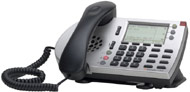
ShoreTel IP phone guides cover the company's proprietary ShorePhone handsets — including the 110ip, 230ip, 530, 560, and the IP8000 conference phone for anyone managing a ShoreTel system. Unlike standard SIP phones from Polycom, Grandstream, or Digium, ShoreTel handsets are proprietary devices that are locked to the ShoreTel platform: they communicate using ShoreTel's own signaling and must be registered to a ShoreGear switch or ShoreTel server to function at all. That means you can't simply plug a ShorePhone into an Asterisk-based PBX or a generic hosted VoIP service and expect it to work. Because of this tight hardware-and-server integration, the correct user guide for your specific model is the only reliable way to get features like call handling, voicemail, and the programmable keys set up properly.
Shoretel 110 ip Phone Quick Guide
Shoretel 110 ip Phone User Guide
Shoretel
115 ip Phone User Guide
Shoretel
IP210 Telephone User Guide
ShorePhone IP230 Quick Install Guide
Shoretel 230 ip Phone User Guide
Shoretel
480 ip Telephone Complete User Guide
Shoretel 530 560/560g Phone Quick Guide
Shoretel 530 560/560g Phone User Guide
Shoretel IP8000 Conference User
User Guide
Shoretel IP930d
Telephone User
User Guide
Shoretel
Button Box BB24
User Guide
Shoretel IP Phones Brochure
Shoretel Shoreware Administration Guide
This guide by ShoreTel explains how to use ShoreWare Director to configure, administer, and maintain the ShoreTel 8.1 system and contains the complete instructions to administer the ShoreTel system.
Shoretel Shoreware Administrator Guide
Shoretel ShoreGear Switch Guides and Shoretel Communicator
The ShoreGear switch install guides walk you through physically deploying the hardware — from the compact ShoreGear 60 to the ShoreGear 50/90 — covering racking, cabling, and initial configuration of the switches that power the proprietary ShorePhone endpoints. Use the system-level administration, maintenance, and planning-and-installation guides spanning ShoreTel 7.5 through 14.2, for everything; from day-to-day user and voicemail administration to capacity planning and system maintenance. These manuals will help to manage and keep a legacy deployment running smoothly even as the platform ages. Rounding out the set are the ShoreTel Communicator guides, which cover the Windows desktop softphone client and its quick-reference essentials, letting end users place calls, check voicemail, and manage presence from their PCs. Together these documents give a technician everything needed to install, maintain, and administer a ShoreTel system end to end — and they're all available here as free PDF downloads.
ShoreTel
ShoreGear 60 Switch Install Guide
ShoreTel
7.5 Administration Guide
ShoreTel
7.5 Planning & Installation Guide
ShoreTel
Shoregear 50/90 Installation Guide
ShoreTel
12.2 Maintenance Guide
ShoreTel
12.2 Administration Guide
ShoreTel
14.2 Maintenance Guide
ShoreTel
14.1 System Administrator Guide
ShoreTel
12.2 Planning and Installation Guide
ShoreTel
11.1 Administration Guide
Shortel Communicator Guide for Windows
Shortel Communicator Quick Reference Guide
Shoreware Call Manager Manual
For renewed Shoretel IP telephones from a trusted vendor;
ShoreTel ShorePhone IP 230 Phone
ShoreTel IP 480G Phone
ShoreTel 230 Silver IP Phone
About Shoretel
 Shoretel, (now owned by Mitel) originally based out of California in the United States, offers phone system solutions
and Unified Communications
based on IP. Their systems are high end and compete with Cisco for the large
company end user market. Although,
distributed through a Channel Partner program, which has been revamped over the years, Shoretel had struggled
somewhat to successfully deliver returns to their investors, even though these systems are reliable and well
designed. In 2017 Mitel closed on an acquisition/merger of Shoretel.
As a result of the merger, ShoreTel is now a wholly-owned subsidiary of
Mitel. In April 2018 Mitel was bought by the private investor group
Searchlight Capital Partners. Mitel now offers Mitel MiVoice Connect as an
upgraded system for Shoretel switches.
Shoretel, (now owned by Mitel) originally based out of California in the United States, offers phone system solutions
and Unified Communications
based on IP. Their systems are high end and compete with Cisco for the large
company end user market. Although,
distributed through a Channel Partner program, which has been revamped over the years, Shoretel had struggled
somewhat to successfully deliver returns to their investors, even though these systems are reliable and well
designed. In 2017 Mitel closed on an acquisition/merger of Shoretel.
As a result of the merger, ShoreTel is now a wholly-owned subsidiary of
Mitel. In April 2018 Mitel was bought by the private investor group
Searchlight Capital Partners. Mitel now offers Mitel MiVoice Connect as an
upgraded system for Shoretel switches.
NOTE: PbxMechanic.com is a participant in the Amazon Services LLC Associates Program, an affiliate advertising program designed to provide a means for sites to earn advertising fees by advertising and linking to products on Amazon.com. Amazon and the Amazon logo are trademarks of Amazon.com, Inc, or its affiliates.